
 Contact Support



 Categories
 All Items
 Themes
 Plugins
 Exclusive Deal
 Support
 Membership
 CHANGELOG
BuddyPress BuddyBlog Groups 1.0.0-RC-14

Recently Updated
100% Original Product & Well Documented
♥ Loved by Many!
0 sales
Version 1.0.0

GPL License
Original price was: $64.00.$3.99Current price is: $3.99.
- Verified from VirusTotal
- 100% Original Product and Virus Free.
- Free New Version Lifetime On Single Purchase.
- Unlimited Website Usage
- Price is in US dollars and included tax
Sale will end soon

SSL Secured Checkout






Verified From


- Products Are Purchased and Downloaded From Original Authors.
- The File is 100% Completely Untouched and Unmodified.
- Last Update: 17.Feb.2026
- Version: 1.0.0

Premium Membership
Download this product for FREE and also gain access to 5,000+ premium themes and plugins.

Secure Transaction
Your transaction is secure with the Stripe. One of the famous payment gateway
Virus Free
Our all items on our website are Virus free and tested with "McAfee Secure"
Timely Update
After publishing the new update from author we upload the latest file on our website
Product Description and Reviews
BuddyPress BuddyBlog Groups Latest Version
This is a GPL-distributed version. No official support. Clean, secure, and legally redistributed under the GPL license.
Groups in BuddyPress are gatherings of members, posts, and any other user-generated content.
If enabled by the site administrator, any member can create a group in BuddyPress. When a member creates a group, this person automatically becomes the group administrator.
Group administrators can also approve requests to join the private group, invite friends to congregate within a hidden group, establish communications among members, extend privileges to other members, and enable new features (such as Group Forums if enabled by Super Admin) among others.
Sections – BuddyPress BuddyBlog Groups GPL
The following is a table of contents outlining each specific area that the Groups component entails:
- Groups Directory
- Single Group
- Group Header
- Activity (group home page)
- Members
- Send Invites
- Admin
- Groups Management Panels
- Link: Group Settings and Roles
- Link: How To Join A Private Group
Groups Directory – BuddyPress BuddyBlog Groups GPL
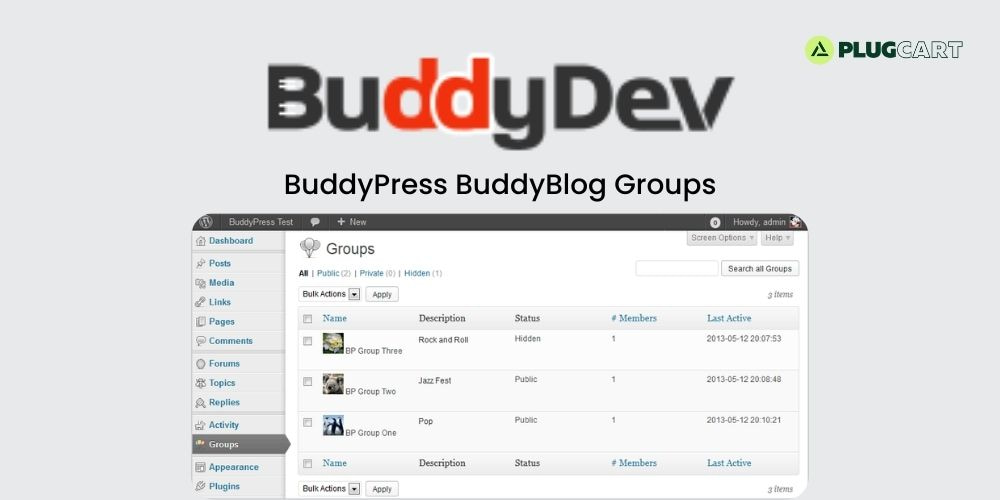
The Groups Directory is a page where users can find all the created groups on your BuddyPress site.
The following outlines each actionable item on the Groups Directory page:
- Create a Group button/link – Shown beside the Groups page title to logged in member if the Site/Super Admin has enabled group creation by members.
- Search Groups search form
- All Groups – with total number of registered users who have logged in at least once after BuddyPress was activated in the installation.
- Selectbox – Show: Last Active (default), Most Members, Newly Created, or Alphabetical
- List of Groups created in the site including time active stamp, group description, number of members and group privacy setting. Only Public and Private Groups are seen in list by regular members.
- Super/Site Admin sees all groups including Hidden groups.Action buttons – for logged in members only
- Join Group button – for groups listed as Public, button visible to logged in members only.
- Request Membership button – for groups listed as Private, button is visible to logged in members only.
- ( Membership in Hidden groups is by invitation only.)
- My Groups – for logged in users only. This includes a counter of the total number of groups you have created and/or joined inOptions
- Selectbox – Show: Last Active (default), Most Members, Newly Created, or Alphabetical
- List of Groups you are a member of – Public, Private and Hidden (only by you and Super Admin)
- Leave Group button – visible to logged in members of Public, Private and Hidden Groups. You cannot leave the group if you are the only Group Admin.
Single Group Header-BuddyPress BuddyBlog Groups GPL
When users visits a single group page, they will see a group header with various actionable items available to them.
The following outlines each area of a group’s header:
Sections
- Group Avatar or Site Default Avatar
- Group Name
- Group Description
- Group Admin/s with avatar/s
- Group Mod/s (if any) with avatar/s
- Join Group button (for a Public group) or Request Membership button (for a Private Group) or Leave Group button (for Public, Private or Hidden Group)
Home Page- BuddyPress BuddyBlog Groups GPL
Each group has a homepage. The group’s Activity Stream is the default Home tab for any group.
Here, all members who are a member of the group can add status updates for the group.
Sections
- RSS feed
- Selectbox: Show: Everything (default), Updates, Group Memberships
- Status Update – visible to all logged in group members onlyOptions
Text Area box- Post In – Selectbox: Member’s Profile Page or to one of Member’s Groups
- Post Update button
- List of Group activities. Following buttons/links are visible to logged in group members onlyOptions
- Comment button
- Reply to Comment link
- Favorite button or Remove Favorite button
- Delete button – visible only to Group Admin, Group Moderator and Super/Site Admin.
Members
Each group has a “Members” page where users can find out who has joined the group.
List of Group Members
Sections
- Member Avatar
- Member Nice Name
- Member Active Since
- Action buttons
- Options
- Add Friend (friendship request) button – visible to logged in group members
- Cancel Friendship Request button – visible to the group member who made the friendship request
- Cancel Friendship button – visible to the group member whose friendship request was accepted
- Favorite button or Remove Favorite button
Send Invites
Each group has a “Send Invites” page where users can invite other users to join the group.
The visibility of this link is dependent on what option the Group Admin chose on the group settings page — “Admin > Settings > Group Invitations: All group Members, Group Admins and Mods only, or Group admins only”.
Options
- Info: Select people to invite from your friends list.
- List of your friends with checkbox beside each name is shown in panel.
- Select friend and the friend is automatically listed in invite list.
- Remove Invite button – click to remove friend/s from list prior to sending invitation
- Send Invites button – click to send invitation/notification to one or group of friend/s
Admin
Each group has an “Admin” page where group administrators can configure various aspects of the group.
These group admin pages are only visible to the group’s administrators and the Super/Site Admins of your WordPress installation.
The following outlines each admin page available to group administrators:
Sections
DetailsOptions
- Group Name (required) text area
- Group Description (required) text area
- Notify group members of changes via email – Yes or No option
Save Changes button
Settings
- Privacy Options – Group Admin selects from among three options (About Group Privacy Options)Options
- This is a public groupOptions
- Any site member can join this group.
- This group will be listed in the groups directory and in search results.
Group content and activity will be visible to any site member.
- This is a private groupOptions
- Only users who request membership and are accepted can join the group.
- This group will be listed in the groups directory and in search results.
- Group content and activity will only be visible to members of the group.
- This is a hidden groupOptions
- Only users who are invited can join the group.
- This group will not be listed in the groups directory or search results.
- Group content and activity will only be visible to members of the group.
- Group Invitations – select which members of this group are allowed to invite others?Options
- All group members
- Group admins and mods only
- Group admins only
- AvatarOptions
- Upload an image to use as an avatar for this group. The image will be shown on the main group page, and in search results.- .jpg, .gif or .png format
- Choose File button (no file chosen)
- Upload Image button
- If you’d like to remove the existing avatar but not upload a new one, please use the delete avatar button.
Delete Avatar button
Members
- List of members according to member’s role in group – visible to
- Group Admin and Super/Site Admin only. (About Group Roles).
Administrator/s – If there’s only one Group Admin, there will be no button to demote or remove the user as there must always be a group admin position.Option - Demote to Member button – Shows up only if there’s more than one Group Admin
Moderator/sOptions
- Promote to Admin button
- Demote to Member button
Member/sOptions
- Kick & Ban button
- Promote to Mod button
- Promote to Admin button
- Remove from Group button
Delete
- WARNING: Deleting this group will completely remove ALL content associated with it. There is no way back, please be careful with this option.
- Checkbox: I understand the consequences of deleting this group.
- Delete Group button
Groups Management Panels- BuddyPress BuddyBlog Groups GPL
BuddyPress provides admin dashboard panels to help you manage the Groups created in your site, including membership and settings (added in BuddyPress 1.7).Sections
- General TypeOptions
- All
- Public
- Private
- Hidden
- Bulk Actions: Delete (Apply)
- Search All Groups form
- Pagination
- List of All GroupsColumns
Name: Avatar and Group NameOptions
Visit: Goes to Group’s home page in the front end of the site
Edit: Opens up a new Group Management panel in dashboard to edit the GroupSections
- Name and DescriptionInputs
- Name of Group
- Text area for Description of Group
- Add New MembersInput
- Start typing a username to add a member
- Manage MembersTypes
- AdministratorsColumns
- ID: User ID Number
- Name: Avatar and Username which link to the Member’s Activity >
- Personal page in frontend
- Group RoleSelectbox
- Administrator (default)
- Moderator
- Member
- Banned
- Remove from Group (Member cannot be removed if said member is
- the only Group Administrator)
- Moderators: Either “No members of this type” if there is no Group
- Mod orColumns
- ID: User ID Number
- Name: Avatar and Username which link to the Member’s Activity >
- Personal page in frontend
- Group RoleSelectbox
- Administrator
- Moderator (default)
- Member
- Banned
- Remove from Group
Members: Either “No members of this type” if there are no members yet orColumns
- ID: User ID Number
- Name: Avatar and Username which link to the Member’s Activity >
- Personal page in frontend
- Group RoleSelectbox
- Administrator
- Moderator
- Member (default)
- Banned
- Remove from Group
- Banned Users Either “No members of this type” if there is no banned
- user orColumns
- ID: User ID Number
- Name: Avatar and Username which link to the Member’s Activity >
- Personal page in frontend
- Group RoleSelectbox
- Administrator
- Moderator
- Member
- Banned (default)
- Remove from Group
- SaveOptions
- Delete Group link
- Save Changes button
- SettingsElements
- Checkbox: Enable discussion forum (if bbPress plugin is activated and
- Group Forums are enabled in bbPress Settings page)
- PrivacyOptions
- Public (default)
- Private
- Hidden
Who can invite others to this group?Options
- All group members (default)
- Group admins and mods only
- Group admins only
Add a review
Currently, we are not accepting new reviews
Top Selling
Version 4.0.1

Original price was: $400.00.$3.99Current price is: $3.99.
2212 sales
Version 27.2

Original price was: $99.00.$3.99Current price is: $3.99.
818 sales
Version 3.21.0.1

Original price was: $249.00.$3.99Current price is: $3.99.
570 sales
Version 3.0.110

Original price was: $129.00.$3.99Current price is: $3.99.
532 sales
Version 8.4.1

Original price was: $59.00.$3.99Current price is: $3.99.
475 sales
Version 4.12.4

Original price was: $59.00.$3.99Current price is: $3.99.
370 sales
Version 12.7.5

Original price was: $59.00.$3.99Current price is: $3.99.
248 sales
Version 8.1.4

Original price was: $99.00.$3.99Current price is: $3.99.
245 sales
Related products
Version 4.28.0
Original price was: $66.00.$3.99Current price is: $3.99.
20 sales
Version 7.15.1
Original price was: $69.00.$3.99Current price is: $3.99.
155 sales
Version 8.7.2

Original price was: $74.00.$3.99Current price is: $3.99.
94 sales
Version 4.5.1

Original price was: $49.00.$3.99Current price is: $3.99.
13 sales
Version 3.5.16.1
Original price was: $22.00.$3.99Current price is: $3.99.
15 sales
Version 2.3.1.1

Original price was: $39.00.$3.99Current price is: $3.99.
5 sales
Version 3.6.9

Original price was: $59.00.$3.99Current price is: $3.99.
131 sales
Version 1.53.0
Original price was: $59.00.$3.99Current price is: $3.99.
4 sales
Version 2.3.0

Original price was: $15.00.$3.99Current price is: $3.99.
12 sales
Version 2.9.0
Original price was: $59.00.$3.99Current price is: $3.99.
13 sales
Version 4.12.4
Original price was: $59.00.$3.99Current price is: $3.99.
370 sales
Version 12.4.1.2

Original price was: $160.00.$3.99Current price is: $3.99.
59 sales
Version 2.2.3

Original price was: $49.00.$3.99Current price is: $3.99.
68 sales
Version 1.9.15

Original price was: $99.00.$3.99Current price is: $3.99.
35 sales
Version 2.2.6

Original price was: $10.00.$3.99Current price is: $3.99.
10 sales
Version 2.3.2

Original price was: $22.00.$3.99Current price is: $3.99.
21 sales
Version 12.7.5
Original price was: $59.00.$3.99Current price is: $3.99.
248 sales
Version 2.12.18
Original price was: $57.00.$3.99Current price is: $3.99.
4 sales
Version 4.10.1
Original price was: $79.00.$3.99Current price is: $3.99.
19 sales
Version 1.5.10

Original price was: $22.00.$3.99Current price is: $3.99.
6 sales
Version 2.30.0

Original price was: $89.00.$3.99Current price is: $3.99.
15 sales
Version 28.3.3

Original price was: $59.00.$3.99Current price is: $3.99.
116 sales
Version 1.12.14

Original price was: $199.00.$3.99Current price is: $3.99.
27 sales
Version 3.21.0.1
Original price was: $249.00.$3.99Current price is: $3.99.
570 sales
Sorry, no reviews match your current selections
WINTER SALE OFFERS • GET 25% OFF ON 1 YEAR & LIFETIME MEMBERSHIP USE COUPON CODE: SPECIALDISCOUNT25 • BUY TWO GPL PRODUCTS AT JUST $6 USE COUPON CODE: BUY2 • GET 25% OFF ON 1 YEAR & LIFETIME MEMBERSHIP USE COUPON CODE: SPECIALDISCOUNT25 • BUY TWO GPL PRODUCTS AT JUST $6 USE COUPON CODE: BUY2 • GET 25% OFF ON 1 YEAR & LIFETIME MEMBERSHIP USE COUPON CODE: SPECIALDISCOUNT25 • BUY TWO GPL PRODUCTS AT JUST $6 USE COUPON CODE: BUY2 • GET 25% OFF ON 1 YEAR & LIFETIME MEMBERSHIP USE COUPON CODE: SPECIALDISCOUNT25 • BUY TWO GPL PRODUCTS AT JUST $6 USE COUPON CODE: BUY2 •


Reviews
There are no reviews yet